Ingesting Sources
WikiMind supports four source types: web URLs, PDFs, raw text, and YouTube videos. Every ingested source is automatically compiled into a structured wiki article by an LLM.
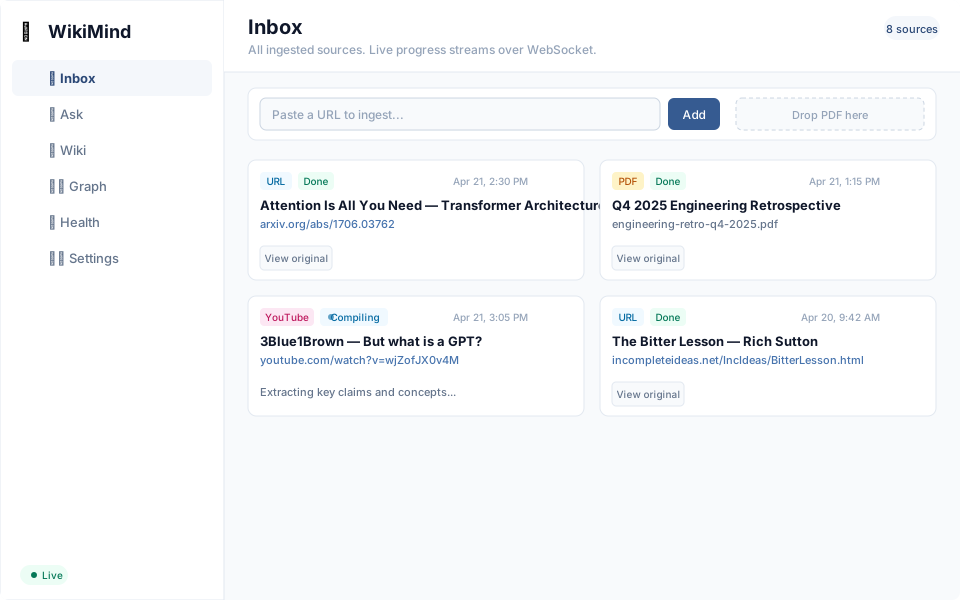
Source Types
Web URLs
Ingest any web page. WikiMind uses trafilatura to extract clean text from HTML, stripping navigation, ads, and boilerplate.
curl -X POST http://localhost:7842/ingest/url \
  -H "Content-Type: application/json" \
  -d '{"url": "https://example.com/article"}'
The URL adapter also handles:
- PDF URLs -- If the URL path ends with
.pdfor the response Content-Type isapplication/pdf, WikiMind downloads the file and routes it to the PDF adapter automatically. - YouTube URLs -- URLs containing
youtube.comoryoutu.beare routed to the YouTube adapter.
PDF Documents
Upload PDF files for structured extraction. WikiMind uses docling-serve as a sidecar for high-quality extraction including heading hierarchy, tables, and OCR. If docling-serve is unavailable, it falls back to basic text extraction via pymupdf.
PDF-specific features:
- Vision-enhanced slide decks -- Pages with little text (diagrams, charts, cover slides) are rendered as images and described by a multimodal LLM. Controlled by
WIKIMIND_VISION_ENABLED(default: true). - Image extraction -- Figures and tables are extracted from PDFs and served via the
/images/endpoint. Displayed alongside articles in the frontend. - Structured extraction -- docling-serve preserves heading hierarchy, table structure, and performs OCR on scanned pages.
Raw Text
Paste notes, meeting transcripts, or any plain text:
curl -X POST http://localhost:7842/ingest/text \
  -H "Content-Type: application/json" \
  -d '{"content": "Your text content here...", "title": "Optional title"}'
If no title is provided, the compiler generates one from the content.
YouTube Videos
Ingest YouTube videos by URL. WikiMind extracts the transcript using youtube-transcript-api:
curl -X POST http://localhost:7842/ingest/url \
  -H "Content-Type: application/json" \
  -d '{"url": "https://www.youtube.com/watch?v=VIDEO_ID"}'
Both youtube.com and youtu.be short links are supported.
Auto-Compilation
By default, ingested sources are automatically queued for compilation (auto_compile: true). You can disable this per request:
Sources with auto_compile: false are saved with status ingested and must be compiled manually via the jobs API or recompile endpoint.
Deduplication
Sources are deduplicated by content hash. If you ingest the same URL or upload the same PDF twice, the second attempt returns the existing source without reprocessing.
Source Lifecycle
Each source progresses through these statuses:
| Status | Meaning |
|---|---|
ingested | Source saved, not yet compiled |
processing | Compilation in progress |
compiled | Wiki article generated successfully |
failed | Compilation failed (check error message) |
Managing Sources
List sources
# All sources
curl http://localhost:7842/ingest/sources

# Filter by status
curl "http://localhost:7842/ingest/sources?status=compiled&limit=10"
Get a source
Delete a source
View the original document
For PDFs and HTML sources, you can retrieve the original file:
Text and YouTube sources do not have an original document file and return 404.