Building WikiMind: A Personal Knowledge OS Powered by LLMs
Table of Contents
I read a lot. Articles, PDFs, YouTube talks, research papers. The problem is that all of that knowledge lives in scattered bookmarks, half-finished highlights, and a vague sense that “I read something about that once.” I wanted a system that would synthesize everything I consume into a persistent, queryable knowledge base — something that gets smarter every time I feed it.
That’s WikiMind. It’s not a note-taking app (you never write), not a chatbot (it builds something persistent), and not a RAG tool (the wiki is the product, not just a retrieval layer). It’s the synthesis layer that sits above everything you consume.

In this post, I’ll walk through the architecture decisions that shaped WikiMind, with a deep dive into the migration that had the biggest impact on developer experience and deployment economics: extracting PDF processing into a sidecar service.
Architecture Overview
WikiMind is split into two main pieces: a React + TypeScript frontend and a Python FastAPI backend. The frontend handles the reading experience — an inbox for incoming sources, a wiki explorer for compiled articles, and a conversational Q&A view. The backend does the heavy lifting: ingesting sources, compiling them into structured wiki articles via LLM, and answering questions with full source attribution.
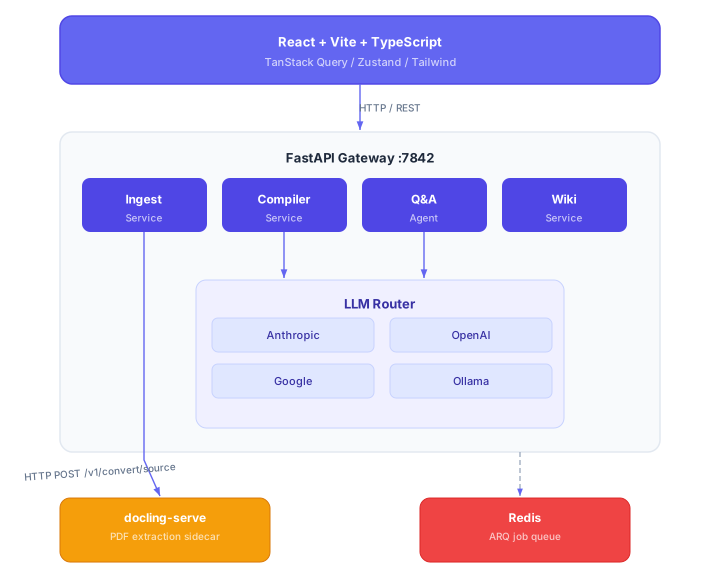
The backend follows a strict layered pattern: route handlers are thin and delegate to service classes, which orchestrate the domain logic. The LLM Router sits at the center, providing a unified interface to multiple LLM providers. Background compilation runs through ARQ workers backed by Redis in production (and in-process asyncio for local dev so you don’t need to run Redis just to hack on features).
The Ingest, Compile, Query Pipeline
The core pipeline has three stages, and understanding the flow between them is key to understanding WikiMind.
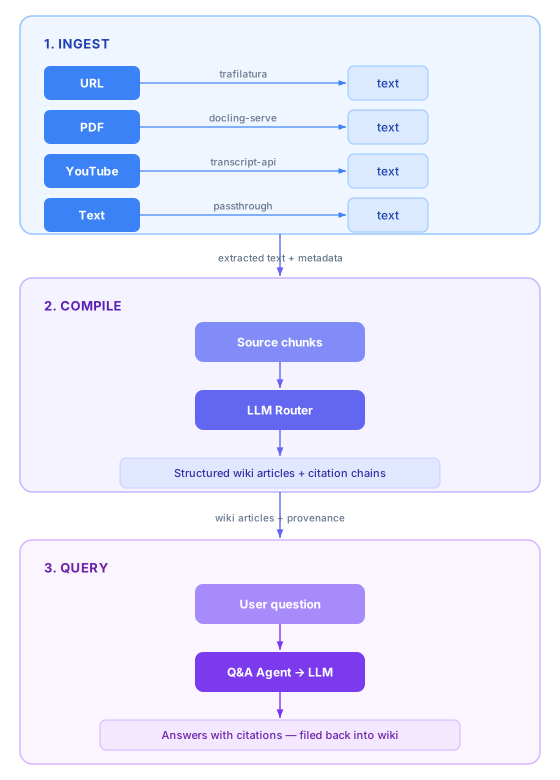
Ingest is adapter-based. Each source type — URL, PDF, YouTube, plain text — has its own adapter that extracts clean text and metadata. URLs go through trafilatura (excellent at pulling article text from messy HTML). PDFs route to the docling-serve sidecar for structured extraction (headings, tables, multi-column layouts, OCR). YouTube videos use the transcript API. The adapters all produce the same output shape: extracted text with source metadata.
Compile is where the LLM does its work. The compiler takes ingested text and asks the LLM to either merge it into existing wiki articles or create new ones. This isn’t summarization — it’s synthesis. If you feed WikiMind three articles about the same topic, it doesn’t give you three summaries; it weaves them into a single coherent article with citation chains back to each original source. Every claim in the wiki knows where it came from.
Query closes the loop. The Q&A agent takes natural language questions, retrieves relevant wiki articles, and generates answers with full source attribution. The clever part: answers themselves get filed back into the wiki, so the knowledge base literally gets smarter with every question you ask.
Multi-Provider LLM Strategy
I didn’t want WikiMind locked to a single LLM provider. Model quality shifts fast, pricing changes, and sometimes you just want to run things locally. So the LLM Router supports four providers out of the box:
- Anthropic (Claude Sonnet 4.5) — the default for compilation, strong at structured synthesis
- OpenAI (GPT-4o) — solid general-purpose alternative
- Google (Gemini 2.0 Flash) — fast and cost-effective for lighter tasks
- Ollama (Llama 3.2) — fully local, no API keys, no data leaving your machine
Providers auto-enable when their API key is detected. Drop OPENAI_API_KEY=sk-... into your .env and OpenAI lights up. No other configuration needed. The router handles fallback automatically — if your primary provider errors out or hits a rate limit, it falls through to the next available provider.
Configuration is intentionally minimal for the common case (set one API key, go) but gives you full control when you want it: model selection per provider, fallback chain ordering, and monthly budget limits are all available in .env.
The Docling-Serve Sidecar Story
This is the architectural change I’m most proud of, and the one with the most dramatic impact on both developer experience and production economics.
The Problem: A 3GB Monolith
WikiMind uses Docling for PDF extraction because it’s excellent — it handles heading hierarchy, tables, OCR, and multi-column layouts far better than basic text extraction. But running Docling in-process meant bundling the entire ML stack into the main application image:
- PyTorch CPU: ~1.7 GB
- Docling + dependencies
- Playwright + Chromium: ~500 MB (for HTML rendering)
- RapidOCR models: ~200 MB
- ONNX Runtime
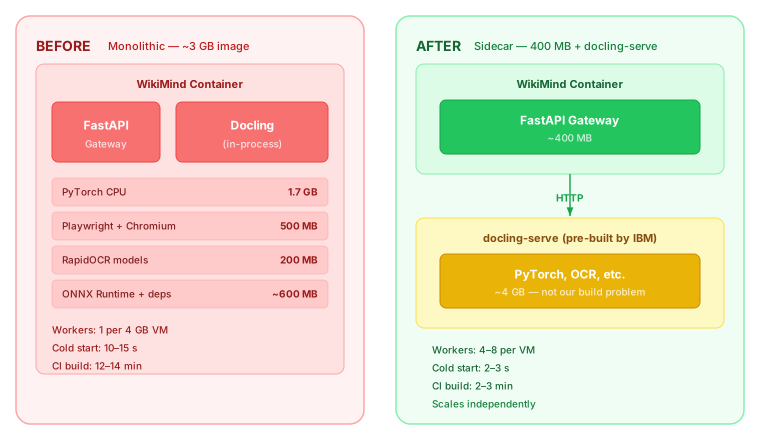
The result was a 3 GB Docker image. CI builds took 12-14 minutes, flirting with the 15-minute timeout. Cold starts were 10-15 seconds. And worst of all, each gunicorn worker loaded the full ML model set into memory, consuming ~500 MB RSS per worker. On a 4 GB Fly.io VM, that meant running exactly one worker — a catastrophic limitation for a web service.
The Solution: HTTP Sidecar
The Docling maintainers (IBM) publish docling-serve — a standalone FastAPI service that wraps Docling behind an HTTP API. Instead of importing Docling directly, WikiMind just calls POST /v1/convert/source on the sidecar. The sidecar handles all the ML heavy lifting; the main app just sends a URL and gets back structured text.
Before and After
| Metric | Before (in-process) | After (sidecar) | Improvement |
|---|---|---|---|
| Main image size | ~3 GB | ~400 MB | 7.5x smaller |
| CI Docker build | 12-14 min | 2-3 min | 5x faster |
| Cold start | 10-15 s | 2-3 s | 5x faster |
| Workers per 4 GB VM | 1 | 4-8 | 4-8x more |
| gunicorn timeout | 120 s | 30 s | 4x tighter |
| PDF extraction latency | In-process | +~100 ms (network) | Negligible |
The key insight: the ~100 ms network hop per PDF request is completely negligible compared to the 5-30 seconds that Docling actually takes to extract a complex PDF. We traded imperceptible latency for a dramatically better deployment profile.
Production Topology on Fly.io
In production, the sidecar runs as a separate Fly.io app on the internal network:
- wikimind (
fly.toml): The main app. 1 GB RAM, shared CPU, auto-stop/start on connection count, 4 gunicorn workers. - wikimind-docling (
fly.docling.toml): The sidecar. 4 GB RAM, 2 shared CPUs, auto-stop/start on request count, internal-only (no public routing).
The main app reaches the sidecar at http://wikimind-docling.internal:5001. Both apps have independent health checks and can scale independently. When nobody is using WikiMind, both machines stop. When a request comes in, the main app starts in 2-3 seconds. If that request involves a PDF, the sidecar starts on demand.
Graceful Degradation
Not every environment has (or needs) docling-serve running. WikiMind retains a pymupdf (fitz) fallback that does basic text extraction without structure. You get plain text instead of heading hierarchy and tables, but PDF ingestion still works. The sidecar is an enhancement, not a hard dependency.
Deployment
WikiMind supports three deployment modes, matching different stages of the project lifecycle.
Local dev uses make dev for a single-process uvicorn server with hot reload. Background jobs run in-process via asyncio. SQLite is the default database. No Docker, no Redis — just pip install and go.
Docker Compose brings up the full stack: gateway, ARQ worker, Redis, and docling-serve. A production-variant compose file (docker-compose.prod.yml) adds PostgreSQL and resource limits (CPU/RAM caps per service), mirroring cloud topology on a home server or staging box.
Fly.io handles cloud deployment and is where things get interesting.
Fly.io Production Topology
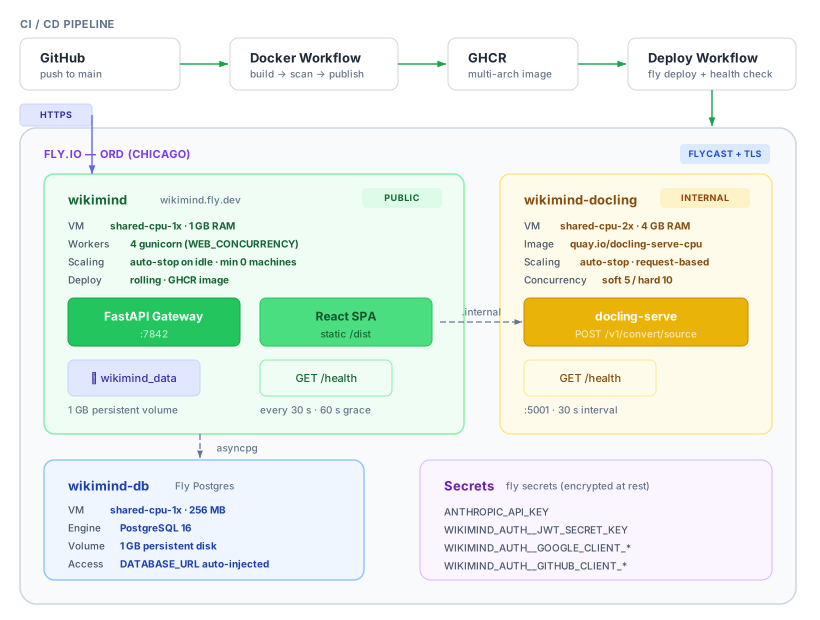
The production stack runs as three independent Fly apps in the ord (Chicago) region:
wikimind is the public-facing app. It serves the FastAPI gateway and the compiled React SPA (baked into the Docker image at build time from the frontend multi-stage build). It runs on a shared-cpu-1x VM with 1 GB RAM and 4 gunicorn workers. A 1 GB persistent volume at /home/wikimind/.wikimind stores SQLite data for single-user deployments, though production uses the attached Postgres cluster. The app has connection-based concurrency limits (soft 25 / hard 50) and uses rolling deploys so there’s zero downtime on redeploy.
wikimind-docling is the PDF extraction sidecar. It’s internal-only — no public routing, reachable only at http://wikimind-docling.internal:5001 on the Fly private network. It uses IBM’s pre-built docling-serve-cpu image directly from Quay.io, so we never build or maintain this image ourselves. It needs more resources (shared-cpu-2x, 4 GB RAM) because it loads PyTorch and OCR models into memory, but since it’s request-scoped (concurrency soft 5 / hard 10), it only spins up when someone actually ingests a PDF.
wikimind-db is a managed Fly Postgres 16 cluster. Fly auto-injects DATABASE_URL as a secret when you attach it to the main app. The entrypoint script runs Alembic migrations on startup, so schema changes ship with the code and apply automatically on deploy.
Zero-Cost Idle
The most important configuration detail for a personal project: every machine is set to auto_stop_machines = "stop" with min_machines_running = 0. When nobody is using WikiMind, all three apps stop completely. Fly charges nothing for stopped machines. When a request comes in:
- The Fly proxy receives the HTTPS request and starts the
wikimindmachine (~2-3 s cold start). - If the request involves PDF ingestion, the gateway calls
wikimind-docling.internal:5001, which triggers that machine to start on demand. - Postgres stays running or starts via the same mechanism.
This means WikiMind costs essentially nothing when idle — just the persistent volume storage (~$0.15/GB/month). During active use, you’re paying for the actual compute seconds consumed. For a personal knowledge base that gets fed a few articles a day, the monthly bill rounds to zero.
CI/CD: Push-to-Deploy
The deployment pipeline chains two GitHub Actions workflows:
-
Docker workflow fires on push to
main. It builds the multi-stageprodDocker image (which includes the compiled React frontend), runs a Trivy CVE scan (fails on unfixed CRITICAL/HIGH), and publishes multi-arch images (amd64 + arm64) to GHCR. A weekly Monday rebuild from scratch catches base-image bit-rot that layer caching hides day-to-day. There’s also a hard image size gate at 1200 MB — if a dependency accidentally pulls in PyTorch again, CI fails. -
Deploy workflow triggers when the Docker workflow succeeds. It deploys the docling-serve sidecar first (creating the app if it doesn’t exist), then deploys the main app using the freshly-published GHCR image. After deploy, it polls
https://wikimind.fly.dev/healthevery 2 seconds for up to 60 seconds, failing the workflow if the health check doesn’t return{"status": "ok"}.
The entire chain — code push to verified production deployment — takes about 5 minutes.
Infrastructure Setup
First-time setup is handled by an idempotent bash script (scripts/fly-setup.sh) that creates the app, volume, Postgres cluster, configures secrets (API keys, JWT secret, OAuth credentials), and prints a deploy token for CI. It’s safe to re-run — each step checks whether the resource exists before creating it. The only manual steps are adding the FLY_API_TOKEN to GitHub secrets and configuring OAuth redirect URIs.
Database Layer
The database story is intentionally layered: SQLite for single-device development, PostgreSQL for shared access across devices and cloud deployments. The same codebase and queries work on both, thanks to SQLModel’s abstraction over SQLAlchemy. The docker-entrypoint.sh checks whether DATABASE_URL points to Postgres and runs Alembic migrations accordingly — SQLite deployments skip migrations entirely since SQLModel handles table creation directly.
What’s Next
WikiMind’s core pipeline — ingest, compile, query, file-back — is solid. Phase 2 is about making the knowledge base more navigable and more intelligent:
- Semantic search via ChromaDB and embeddings, so queries match on meaning rather than just keywords
- Knowledge graph view to visualize how sources and articles interconnect
- More source types — podcasts, Kindle highlights, RSS feeds
- Wiki health dashboard to surface stale articles, contradictions, and gaps in coverage
- Collaboration — shared wikis where a team feeds the same knowledge base
The architecture was designed to support all of this. The adapter pattern makes new source types a single-file addition. The LLM Router means any of these features can leverage whichever model is best suited. And the sidecar pattern established with docling-serve gives us a template for extracting any future heavy-compute concern (like embedding generation) into its own scalable service.
If you’re interested, the project is on GitHub. Set one API key, run make dev, and start feeding it.
Enjoying this article?
Ship AI is a video podcast covering the trends, tools, and strategies driving enterprise AI. New episodes every two weeks.